fd0becf66140dbdc6037bf97b09f51da459faf81b7f1bdec9d Tips N Tricks: Android Google+

Search This Site

Comments

Showing posts with label Android. Show all posts

Wednesday, 28 September 2016

Use 2 Simultaneous whatsapp on Android Device without rooting.

Now this trick no longer works, Please visit here for new trick.


Now this trick no longer works, Please visit here for new trick.


Before you proceed please download these two files.


Now follow these steps.


  1. Uninstall whatsapp
  2. Rename the folder whatsapp to ogwhatsapp in SDcard
  3. Now install OGwhatsapp that you downloaded from above link and configure the number that you were already using on whatsapp. It will verify automatically.
  4. Now install whatsapp and configure new number in this.

Everything this Done..:) Enjoy 2 whatsapp on your Android Device.

Features of OGWhatsapp


  • You can run 2 numbers in one device
  • You can take a Backup of Data & restore it
  • You can choose the app icon
  • Preview Images & Videos without download


And more

Latest trick to use Multiple whatsapp on single device without root. (No root required)

September 2016 Latest trick to use Multiple whatsapp on single device without root. (No root required)


Before you proceed please download below file.


Now follow these steps.


  1. Install GBwhatsapp.
  2. Verify your second number in GBWhatsapp.
  3. Enjoy multiple whatsapp withou root.

Everything this Done..:) Enjoy 2 whatsapp on your Android Device.

Features of GBWhatsapp

  • You can run 2 numbers in one device
  • You can take a Backup of Data & restore it
  • You can choose the app icon
  • Preview Images & Videos without download
  • Freeze Last Seen


And more

Friday, 23 September 2016

100 % Disable Auto-Update of Google Play Service


Requirements:
1. Rooted android Device. (Root your device Guide - Click Here)
2. Lucky Patcher - Download Here

Follow the video tutorial made by me.

If you like please subscribe to my channel. Subscribe here

Sunday, 14 June 2015

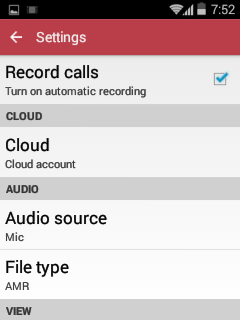
Automatic Call Recorder Pro version 4.16


Download APK file here


Record any phone call you want and choose which calls you want to save. You can set which calls are recorded and which are ignored. Listen to the recording, add notes and share it. Integration with Google Drive™ and Dropbox allows calls to be saved and synchronized to the cloud as well.
Google Drive integration works on Android versions 3.0 and above.
Please note that call recording does not work on certain handsets and can result in inferior quality recordings. We therefore suggest that you try the free version before purchasing the paid app.
If you encounter any recording issues or wish to improve voice quality, try recording from a different audio source, or use auto-on speaker mode.
Recorded calls are stored in the Inbox. You can change the destination recordings folder to an external SD card as well. You can set the size of the inbox. The number of saved calls is limited only by your device memory. If you decide that a conversation is important, save it and it will be stored in the Saved Calls folder. If not, old recordings will automatically be deleted when new calls fill up the inbox.
You can enable a Call Summary Menu with options to appear immediately after a call.
Search for recordings by contact, phone number, or note.

There are 3 default settings for automatic recording:
Record everything (default) – This setting records all calls except for contacts pre-selected to be ignored.
Ignore everything – This setting records no calls except for contacts pre-selected to be recorded.
Ignore contacts – This setting records all calls with people who are not contacts, except for contacts pre-selected to be recorded.
In the Pro version only: You can set calls from particular contacts to be automatically saved, and they will be saved in the cloud.
This app contains ads.

Install Android KitKat 4.4.4 on Samsung Galaxy GT-S5360

Hello folks,

Its time to flash most stable and fast custom rom to your samsung galaxy Y GT-S5360 mobile device. Most of you had installed it previously and then remove it because of its laggy interface and slow performance. But this time I will show you how you can install CyanogenMod 11 KitKat 4.4.4 to your device. If you are going to do this then it is obviously that you already know about CyanogenMods and Custom Rom, and if not than please google it.

All you need is rooted samsung galaxy Y GT-S5360 device and below mentioned files. If your device is not rooted then please root it - Follow this article to root your samsung galaxy Y GT-S5360.


Download Following files:-


Once you have download the above files, copy it to your sd card in root directory and follow these steps. Remember please make sure you have atleast 70-80 percent battery backup.

1. Backup all your data, Contacts, SMS, Call log etc..
2. Switch off your device, go into recovery mode using Volume Up + Home + Power key.
3. Use volume buttons for navigation and power button for selection, Select "apply update from sd card" and select CWM Recovery 6.0.5.3 (6.0.5.3-totoro.zip) file and install it.
4. After it go to advance and select "Reboot recovery" or "reboot system now" if you dont find reboot recovery or advance tab.
5. Now you will reboot in cwm recovery 6.0.5.3. , now select "wipe data / factory reset" and then yes.
6. go to "mount and storage" format data, system, cache, and than mount data, system and cache.
7. Now go to install from sd card and select cyanogenMod 11 Room zip file (cm-11.0.0-RC13-GT-S5360-totoro.zip) from sd card and install it. After installtion completes select reboot device.

First boot may take 15-20 minutes please wait.

After first reboot again, switch off your phone and go to recovery mount data, system, and cache and install mini google apps zip file. after it select reboot system.

And if you want to install indian language fonts (hindi, gujarati, marathi etc) than click here


NOTE -
Those who having SIM card error or No Service issue.. First please falsh your device with this

http://www.4shared.com/zip/y0zOd_vOce/S5360_DDMD1_ODDMD1_DDMD1_Droid.html 

stock rom. after this root your device and then flash cyanogenmod.

You will neeed odin - Download it from here -http://myvdrive.com/files/cbaxNiyiRq/Odin307.zip

enter into download mode via switch off your phone, then Vol down + Power on. Connect your device to pc. open odin. Select PDA file in PDA option, MODEM file in PHONE option and CSC file in CSC option in odin. Do not change any other setting. Click start.

If you do not have samsung drivers - Download here - 
http://myvdrive.com/files/gsSNYQGBKH/samsung_usb_driver_for_mobile_phones.exe

Install Indic fonts to android (Hindi, Punjabi, Telugu, Gujarati, Marathi)

This guide is to show you how you can install indic fonts (Hindi fonts, gujarati fonts, kashmiri fonts, assamese fonts, marathi, nepali, oriya, punjabi and sindhi fonts) to any android device with KitKat 4.4 android.

1. Download this zip file. Download Here
2. Copy it to root of your SD-card
3. Boot your device into recovery mode. ( Turn off your device, then press vol up + home + power button)
4. Select install zip from sd-card.
5. Select downloaded zip file.
6. Select yes to confirm.

Now you can see text in any Indian language.

Friday, 27 February 2015

OfficeSuite 8 Pro (Paid Version)

www.mobitipstricks.in
THE LATEST OFFICESUITE 8 NOW BRINGS DESKTOP FEATURES TO A MOBILE LIKE NEVER BEFORE:
  • Seamlessly transition between desktop and mobiles using our updated user interface
  • PDF security and editing features including digital signatures support, permissions management, text to PDF, and annotations
  • Track changes with multiple author support
  • More
KEY FEATURES:
  • View, create and edit complex office and attachments all from a familiar desktop-style interface.
  • Full compatibility with Microsoft formats including DOC, DOCX, DOCM, XLS, XLSX, XLSM, PPT, PPTX, PPS, PPSX, PPTM, PPSM.

Thursday, 29 January 2015

Increase Internal Memory - CyanogenMod (Move Apps and data to sd-ext partiotn)

It is very common to have very low internal memory for android users with older device. This tutorial will help you to increase your internal memory on your device.
Please read this if you are using cyanogenmod rom.
If you are not using cyanogenmod than this is now for you. Click here if you are not using cyanogenmod rom.

Pre requisite -
1. Rooted device
2. Cyanogenmod Rom
3. Simple2ext. Download Here

Below are some screenshot of my Samsung Galaxy GT-S5360 with 200mb internal memory, I have installed applications that needed atleast 400mb internal memory to install.


Follow the below steps to install s2e.apk.


1. Backup all data on sd card as we will format it during the process.
2. after backup, switch of your device and enter to cwm recovery by pressing Volume up + Home + Power buttons.
3. go to advance and select partition sd card, than select swap size maximum and sd-ext partition size as your preference I selected 2 gb as I want 2 gb internal memory.
4. after partition done, you can copy back your files to sd card which you have taken back up. and also copy s2e.apk file also.
5. install s2e.apk and open it, it will ask for root access. Grant root access to it.
6. Check all tick available in application and reboot your device.


When your device reboot all application from internal transferred to sd-ext partition. Have fun.

Monday, 26 January 2015

Increase internal memory on any android device - Link2SD Plus 3.6.2

Low internal memory is a very big issue on older android devices which are having only 200mb or less than 500mb internal memory. This Link2SD needs no introduction as it is a very popular application on android platform to link application on SD card, sd-ext partition or sd-fat32 partition.

It is available freely on google playstore, but there is limitation of linking app data to sd card in free version. Here I will show you how you can convert free version of LinkSD to full version Link2SD.
Pre - Requisite
Follow below mentioned procedure.
1. Open Lucky Patcher and find Link2SD app.

www.mobitipstricks.in

2. Tap on Link2SD app you will see a menu.

www.mobitipstricks.in

3. Now click on "Open Menu of Patches", and you will see list of methods to patch. Select Custom Patch and apply.
www.mobitipstricks.in

After applying patch it will take a moment and your app will be paid version.
www.mobitipstricks.in

Enjoy the paid version friends.

Please Like, share, or g+ it if you like it.

Friday, 23 January 2015

How to Root Samsung Young GT-S5360

Hello Android Users,

This article is on how to root Root Samsung Galaxy Y GT-S5360 from recovery.

Download below file:
1. Update.zip

Download above file and copy it to your sd card. Now enter into recovery mode.
1. Switch of your device.
2. Now press volume up + Home + Power, you will boot into reovery mode.

3. Select Uapply update from sd card using volume keys for navigation and power key for select.

4. Select update.zip and install it. You get succeed message "installation from sd card".

5. Now select "reboot system now". After boot you will see superSU app.

Now your device is rooted, you can now install apps which ask for root or can install custom rom on it.

Sunday, 21 December 2014

Blackmart (Blackmarket) Alpha Latest 1.1 for Android

Blackmart Alpha is a market alternative to the Google Play Store for tablets and smartphones with Android operating system, from Blackmart you can download many applications, without the need to have an account and Google without the need for any kind of registration.

Blackmart Alpha: Functions
Note : Screenshot is of older version, but application is black mart alpha 1.1 .


This market is very simple to use and offers many features to be able to download many applications.
On this market all applications are available for free download on the market Blackmart there is no application “trial” or “test”, there are only complete applications and free.
The Google Play Store is a very comprehensive market offers a number of applications, but unfortunately on Google Play Store, there are many paid apps and some are not often available for download on select smartphones or tablets even though they might be compatible.
On Blackmart this problem is not there, just download the application and try it, there are no limitations.

Its market is very intuitive and has functions for the custom search application.

Sunday, 14 December 2014

Very Easy method to increase RAM on android device

Previously I posted Roehsoft Ram Expander for increasing ram on android device. That method is somewhat complicated, because you have to create a swap partition on sd-card. But this time I posting very easy method to increase Android RAM. Low memory is a very big issue for android users. Follow the below mentioned steps.

Pre-requisite :-

1. Rooted android phone . ( Click here to root your android phone )
2. Swapper for root . Download here
or click here to install direct from playstore it is free
3. SD card. ( Higher the class of sd-card better the performance )
Now just install the swapper for root application on your device and open it.
you will see a check box - "active swap on boot", Tick on it and then configuration can be done.
www.mobitipstricks.in

Select Fat partition or EXT partition wherever you want to swap its your choice. If you have EXT partition on your SD card then you can select that, and if you dont have SD-EXT partition than select SD FAT partition. ( I prefer sd-ext partition because if we swap on sd fat partion then whenever we connect our device with PC as USB mass storage swap will not work and it may damage sd card. so, better you create an ext partion on your sd card. to create sd-ext partition you can use minitool partition wizard. Remember to backup all your data on sd card)

After selecting the partition just mention how much MB space you want to swap and just press save.

Enjoy the speed of your device. Have Fun.!!!

Note :- If this method is not working on your device you can try Roehsoft RAM Expander.

ROEHSOFT RAM Expander (SWAP)

Many android users complains of Low RAM memory, after having latest android with large RAM memory they are complaining for low ram.
So here's the solution to increase your android device RAM by using your SD card as RAM.
Yes now you can use you sd card as RAM on your android device by installing this below application.
You can also get this app in google play store here Where you can purchase it or second option you can download it here.

Note : If you face license verification failed error, then download lucky patcher from below link and install it on your device. Open Lucky Patcher, tap on Roehsoft RAM Expander and open patch menu. and click on remove license check. Done!!!
Download Lucky Patcher - Download

Require : Android 1.6 or up


Download Application Here

www.mobitipstricks.inwww.mobitipstricks.in

Download Application Here

If this trick not working on you device then you can use below mentioned alternate trick.

Alternate method to increase RAM of android device very easily

Sunday, 7 December 2014

Multiple Whatsapp account on single android device

Today I will show you how you can use multiple whatsapp account on a single android device. Before this post I had posted Use 2 Simultaneous Whatsapp on single android device but now this trick no longer can be used as whatsapp updated it app version and blocked the use of OGWhatsapp.
So I will show you new trick to use multiple whatsapp account on one android device. Yes, you can use as many whatsapp account you want to use all you need is a Rooted android device and below mentioned files.

You can see this latest trick to use two different whatsapp on single device.

Pre-requisite:-
1. Rooted android device. ( Click here if your device is not rooted )
2. Titanium bacukp pro. Click here to download
3. whatsapp installed on you device. click here ti download

You can proceed if you have above 3 things done.

1. Open Titanium Backup Application

Friday, 5 December 2014

in-app Purchase bypass / tweak for Android User's

After a very long break I am back again with a nice and updated trick on how you can bypass in-app purchase in various application and games on Android devices.

Pre Requisite's

1. Rooted android device. (click here to learn how you can root you device)
2. freedom.apk installed on your devices.
you can download freedom application here - download

First you have to enable install from unknown sources on your device. This you can find in security settings of your device.


Install the freedom apk and launch it. It will take a while, be patient. Allow SuperUser permissions request.


Open the application through freedom
Tap to open the application in which you want to use free in-app purchase. wait until application starts automatically.


Make your purchase.


From time to time you can receive OTA updates for Freedom, just tap on “Update Available” dialog and update should start automatically. Here is screenshot of running Freedom and update available for download:
 

Root any Android device in this World - Totally free and standalone. No Need of Driver

In this tutorial I will show you how you can root any android device with one click. All you need is vRoot / iRoot application for windows. This application is to be installed on you computer connected to internet and you have to connect you android phone or android tablet to that computer and just Click Root. Make sure you have enable USB Debugging mode under Developer options. If you don't find Developer option on your device just go to About Phone and Tap 6-7 time on Build Version and then you will able to Developer Option in settings.

www.mobitipstricks.in


About iRoot.

iRoot, Formerly Vroot, is a free one click Android root tool designedby XINYI Network. Just click one button, you can root your Android device immediately! 

Tuesday, 21 January 2014

VPN One Click 4.4 Full Version Modded

Vpn One Click protects your privacy online, unlocks all blocked services like Twitter, Facebook, Skype, etc., by connecting to a Virtual Private Network Server. Your public ip address will be different from the real one and the connection will appear as coming from a different country to full protect your privacy. Furthermore, your internet connection will be fully encrypted.
The servers are available in many different countries to allow to change your public ip address and also to watch your national Tv from abroad.
The available countries are: USA,Canada, Australia, United Kingdom,Germany, France, Netherlands, Switzerland,Italy,Singapore, India, Egypt, Russia, Sweden, Spain, Turkey, Hong Kong, Japan and Romania.
Use the service with NO traffic limit.
Real free of charge Vpn service!
There are specific versions for:
- Android
- Windows,
- Mac,
- Ios (iPhone/iPad/iPod).
www.mobitipstricks.in
VPN One Click 4.4

Requirements: Android 4.0+
Overview: Vpn One Click protects your privacy online

What's New
-It solves a connection problem reported occasionally from our Customers. If you had a connection problem, this update could fix it.
For any more problem found, please contact the support available 24 hours per day using the "Contact Support" from the application itself.
I always appreciate your positive comments and suggestions.

Download Here

Monday, 13 January 2014

Whatsapp+ v4.86D Unlocked


http://www.mobitipstricks.in/
Whatsapp+
Overview: What is WhatsApp+? Basically it is a customizable WhatsApp where you can change lots of colours, sizes, and many other visual MODs In addition you can increase upload media limit (stock limit is 16Mb) to send large music files or videos.

You can increase quality of pictures sent (by default resolution is decreased quite a lot) You can share music just with one click You can add contact profile pictures to their chats You can hide contact profile pictures and show phonebook pictures (in chat screen) Built-in theme viewer and downloader. Check WhatsApp+ users themes online and apply theme if you like And more to come Remember to previously uninstall whatsapp if you come from the official version (if not you will get the "not installed" error)

Download Here

Monday, 16 December 2013

OG YouTube v5.2.27 Downloader, All Qualities, Background/ScreenOff Playback v8.10

Keep up with your favorite YouTube channels and access the world’s videos anywhere with the official YouTube app for Android.
www.mobitipstricks.in

What's New
Bug fixes and improvements, notably:
- missing video scrubber bar during fullscreen playback on some devices
- missing action bar (including search) on other devices

Features:
All qualities playable *140p~720p* (Google disable 1080p from being playable)
Download all available qualities
Download more than one video at the same time
4 Formats available to download 3GB, FLV, MP4 and MP3
Pause/Resume option for downloads
Download videos as MP3 directly
Background & Screen off playback
Select default quality
And more

Whats new:
Screen off playback
Background playback
Build unrooted version (com.google.android.ogyoutube)

Installation:
nonroot :
Package Name : com.google.android.ogyoutube
You can install it without delete the original version
Download here non-root installation file

root :
Package Name : com.google.android.youtube
You should delete the original version
Download here rooted installation file
Note :
Don't login to your account. If you, nothing will works


This app has NO advertisements

PDF Max: The #1 PDF Reader! v2.4.1

PDF Max: The #1 PDF Reader! v2.4.1
Requirements: Android 2.2+
Overview: PDF Max is the 5-star rated, full-featured PDF reader used by millions of iPhone/iPad users world-wide and now available for your Android!

It was designed for those people who’re looking for a full-featured, touch-based optimization & professional PDF application. It provides all features you need for an everyday PDF app in one place so that you do not need to spend extra money for other apps.

PDF Max features include:

[PROFESSIONAL PDF READER]

TEXT REFLOW: PDF Max includes an Amazing Text Reflow feature that helps you read your PDF easily with any kind of PDF. Forget the tedious pan & zoom steps, you now just enjoy reading your documents.

TEXT TO SPEECH: Don't keep your eyes on the screen all the time, Let the superb TTS feature in PDF Max does the work: It read PDF documents for you.

FAST RENDERING: PDF Max equips a super-fast rendering engine worked smoothly on all Android Phones/Tablets with Android 2.2 or newer.

FAST SCROLLING: PDF Max is the best PDF app that allows continuous vertical scroll through an entire document. You can also set the option to view one page at a time, it's your choice.

SMART ZOOM: Double-tap on text blocks and PDF Max will zoom the touched text block to fit the screen. Simple & efficient reading.

UI & NAVIGATE: The Navigation Panel lets you interact with your documents by thumbnails, bookmarks, annotations, PDF outline, Search or other common actions.

LARGE PDFs: PDF Max opens large PDFs easily without any problem. The maximum file size is only depending on the file size supported by the device itself.


[FULL-FEATURED PDF ANNOTATOR]

TYPE ON YOUR PDF:
PDF Max lets you insert text into your PDF by creating FreeTexts (a.k.a TypeWriter).

DRAW WITH YOUR FINGER:
Use your finger or a stylus to take handwritten notes or highlight text in books, whether normal PDF or scanned. Eraser is of course also included to help you correct and refine your handwriting.

MARK UP TEXT:
Mark important things in books, journals or documents using Highlight, Underline, Cross-out and Squiggly tools.

CREATE NOTES AND CONVERSATIONS:
Add comments anywhere in the document. PDF Max even supports thread-conversations to help you collaborate with others like never before.

DRAW ANY SHAPE:
Draw, position and resize a multitude of shapes, including Rectangles, Lines, Ovals, Polylines, and Polygons with intelligent snapping.

MANAGE PDF PAGES, BOOKMARKS:
You can reorder pages, insert blank pages and even delete PDF pages. PDF Max also supports manage PDF Bookmarks.

[EASY TO USE AND POWERFUL FILE MANAGER]
Manage your own PDF library or all your PDFs on your devices easily with an intuitive File Management Interface. Dropbox is supported, more storages will be supported in the next updates.

What's New
Version 2.2-2.4:
- Zoom-In Handwriting can be active within Ink tool.
- Improving performance
- New: Zoom-In Handwriting
- Fixed: ALL FILES now allows to browser to any storages, not limited to the default SDCard as before.
- Fixed: Crashed on Android 2.x.
- Fixed: Issues when extracting PDF pages.
New features in Version 2.1:
- New: Dark/Light Themes - Choose your favorite color style in the app's Settings -> Theme.
- New: Signature management [Experimental].

This app has no advertisements

Click here to Download